Sharing Asset location with MyGeotab
In this article you will learn how to share asset location from the map in MyGeotab
1. Go to the map, witch can be found on the left hand side of the screen
2. Select the asset that you want to create a link to and click the share button
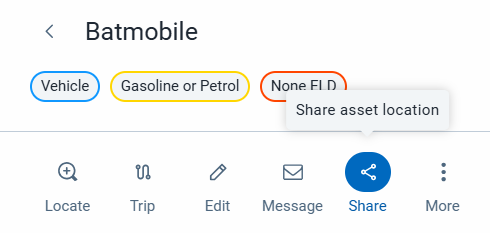
3. Specify how long the link to be active for using the live from and expires after fields
4. Add a destination using the destination field
5. Check the location radius and make sure to adjust it to the preferred radius
6. Click create link
7. A link will be created with a success message
8. You can retrieve the link at any time by going to productivity > asset location sharing
Related Articles
How to Add Assets in MyGeotab
In this article you will learn how to add assets on MyGeotab. 1. Go to the Assets page in the right hand side of the screen 2. Click on the blue plus mark in the top right of the screen 3. Click on Single Asset 4. Enter the asset name 5. Enter the Go ...How to Add Users to MyGeotab
In this article you will learn how to add users on MyGeotab. On the left hand side of the screen: 1. Go to People 2. Users and Drivers 3. Top right of the screen, click the blue plus mark to add a new user 4. For the Username, enter the users email, ...How to create work requests in MyGeotab
In this article you will learn how to create work requests in MyGeotab. 1. On the left hand side of the screen click on maintenance 2. Click on work order management 3. Click on the blue + work request, on the top right hand side of the screen 4. ...How to create groups in MyGeotab
In this article you will learn how to create groups in MyGeotab. 1. Go to groups and rules on the left hand side of the screen 2. Select Groups 3. Locate where you want to add a new group 4. Click the plus sign to create a group in that location 5. ...Learn about built-in rules in MyGeotab
In this article, you will learn how to enable and configure built-in rules, as well as how exceptions work. Enabling built-in rules: 1. On the left hand side of the screen, select groups and rules 2. Select Rules 3. You can toggle the built-in rules ...